
Quickly Move Cells Around a worksheet in Excel Cut/Paste Trick

Moving Cells around a worksheet in Excel is fast an easy. Below I have a table of forenames, surnames and ages. As you can see I have surnames in column D but this would be better off in column B. I need to move the cells in D1:D4 to cells B1:B4.
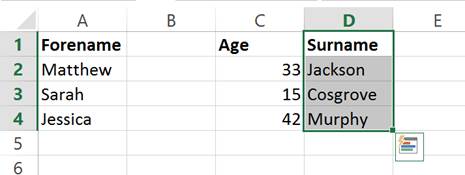
I start by selecting the cells I want to move. (D1:D4) I then move the mouse over the border of my selection. The cursor will change to look like below:
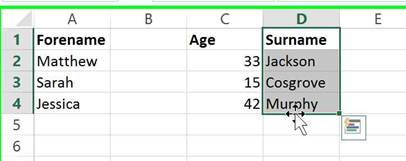
You then left click and drag my selection to where I want to move it.

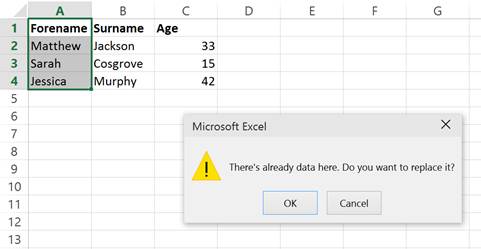
You dont even have to worry about overriding data accidentally as if you move a selection to cells which already contain data, a prompt will appear to ensure you wish to do so. So if I moved my selection to A1:A4, as it contains data, the following pop-up would appear:
This process is the exact same as right clicking on a selection, choosing cut, right clicking where you want it to go and then clicking paste. However using the method I have shown you is much better! It is quicker and doesnt allow you to mistakenly paste information into cells which have data already.
Question? Ask it in our Excel Forum

Excel VBA Course - From Beginner to Expert
200+ Video Lessons 50+ Hours of Instruction 200+ Excel Guides
Become a master of VBA and Macros in Excel and learn how to automate all of your tasks in Excel with this online course. (No VBA experience required.)
Subscribe for Weekly Tutorials
BONUS: subscribe now to download our Top Tutorials Ebook!

Excel VBA Course - From Beginner to Expert
200+ Video Lessons
50+ Hours of Video
200+ Excel Guides
Become a master of VBA and Macros in Excel and learn how to automate all of your tasks in Excel with this online course. (No VBA experience required.)