
Pause a Macro or Make it Slow Down in Excel

How to make a macro stop or pause for a specified amount of time.
This allows you to slow down the execution of a macro.
Method 1 - Simple but Not Versatile
Add this line of code anywhere in your macro where you want it to pause.
Application.Wait(Now + TimeValue("00:00:01"))
This will pause the macro for 1 second.
The first set of zeros is hours; the second set is minutes; the third set is seconds.
Method 2 - More Work but Better - Fractions of Seconds
Sometimes you need to pause a macro for a fraction of a second and, for this, we need to do something else.
Put this piece of code at the top of your module:
Public Declare Sub Sleep Lib "kernel32" (ByVal dwMilliseconds As Long)
It would look like this:
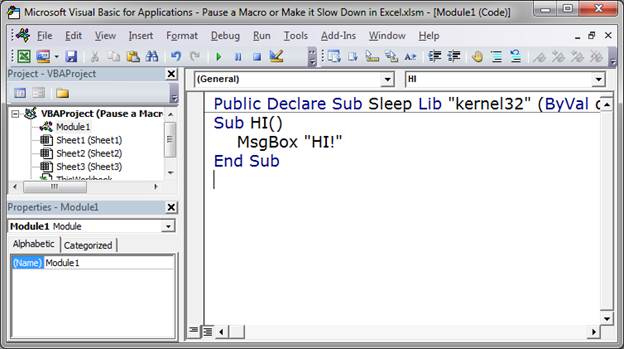
Notice that it was put above the first Sub in the module.
Then, make the macro stop or pause using this method:
Sleep(1000)
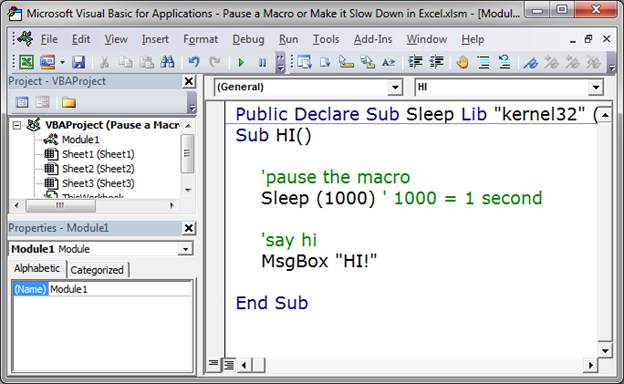
This is in milliseconds, so 1000 equals 1 second, 2000 equals 2 seconds and anything less than a thousand is a fraction of a second.
Both Methods in the VBA Editor
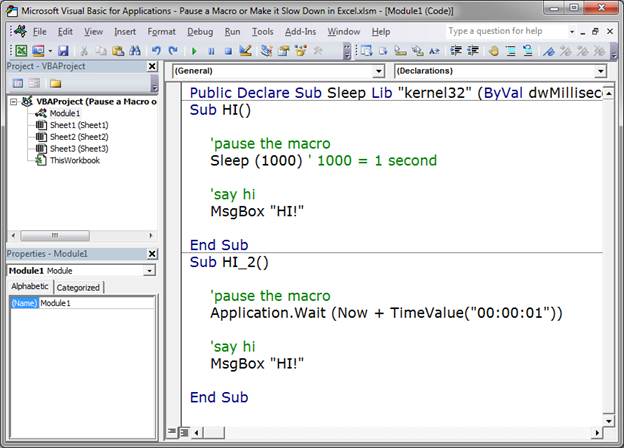
Notes
Both methods have their place; use whichever one works best for you.
Download the sample file attached to this tutorial to see these macros in Excel.
Question? Ask it in our Excel Forum

Excel VBA Course - From Beginner to Expert
200+ Video Lessons 50+ Hours of Instruction 200+ Excel Guides
Become a master of VBA and Macros in Excel and learn how to automate all of your tasks in Excel with this online course. (No VBA experience required.)
Tutorial: Tutorial showing you how to make a user enable macros in a workbook in order to view the w...
Tutorial: This is a simple way to get more space in Excel, reduce clutter, and streamline the inte...
Tutorial: How to round a number up or down and also to a specified number of decimal places in Excel...
Tutorial: (New Easier Version for Excel 2010 and Later) How to increment a value, number, percent, e...
Macro: This is a macro which will delete blank rows in excel. This version will delete an entire ...
Macro: Generate a series of non-repeating random numbers in Excel with this UDF (user defined fun...
Subscribe for Weekly Tutorials
BONUS: subscribe now to download our Top Tutorials Ebook!

Excel VBA Course - From Beginner to Expert
200+ Video Lessons
50+ Hours of Video
200+ Excel Guides
Become a master of VBA and Macros in Excel and learn how to automate all of your tasks in Excel with this online course. (No VBA experience required.)