
Count the Occurrences of the Largest or Smallest Value in a Range

How to count the occurrence of the largest or smallest value in a range; basically, how many times the MAX or MIN value occurs in a range.
Sections:
Max
=COUNTIF(A1:A6,MAX(A1:A6))
A1:A6 is the range with the values. Change that in both places in the formula to fit your data.
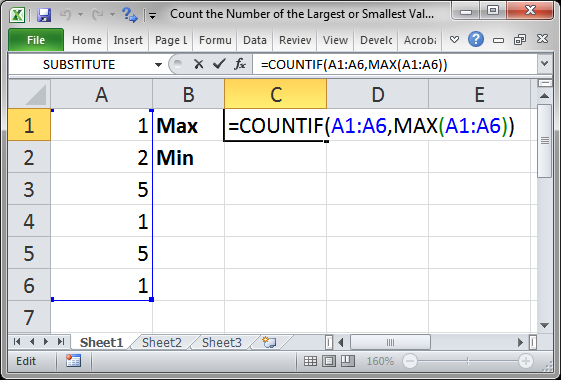
Result:
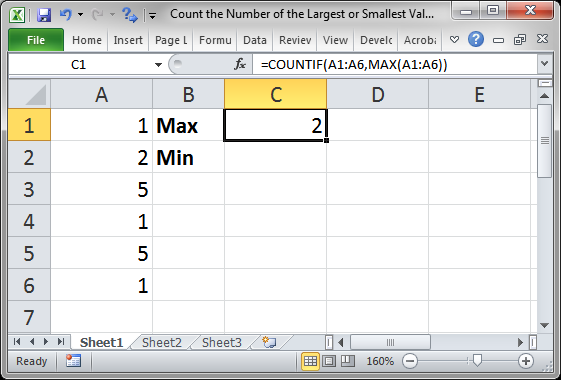
The MAX() function gets the highest value from the range and then returns that to the COUNTIF() function, which uses that to determine which values in the range to count.
Min
=COUNTIF(A1:A6,MIN(A1:A6))
A1:A6 is the range with the values. Change that in both places in the formula to fit your data.
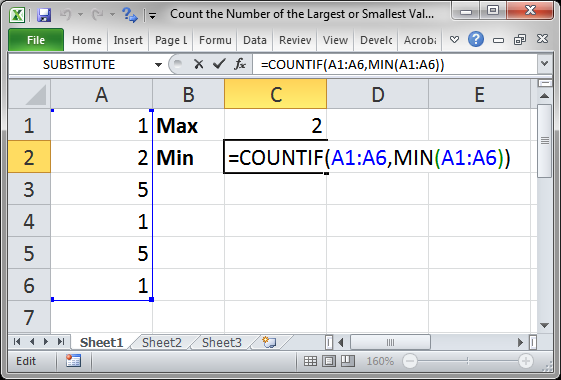
Result:
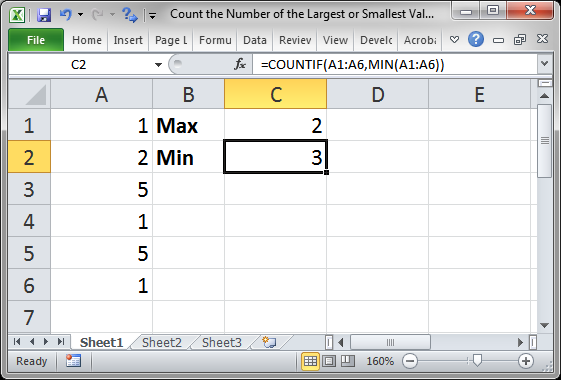
The MIN() function gets the lowest value from the range and then returns that to the COUNTIF() function, which uses that to determine which values in the range to count.
Notes
This is a simple combination of two functions in order to return the count; nothing more takes place here, just some function nesting.
Make sure to download the file for this tutorial to work with these examples in Excel.
Question? Ask it in our Excel Forum

Excel VBA Course - From Beginner to Expert
200+ Video Lessons 50+ Hours of Instruction 200+ Excel Guides
Become a master of VBA and Macros in Excel and learn how to automate all of your tasks in Excel with this online course. (No VBA experience required.)
Tutorial: How to make a user input form in Excel and have the data stored on another worksheet at th...
: Code: Sub Convert_Html_Entities() '''''''''''''' TeachExcel.com '''''''''''''' 'Conver...
: Sub Convert_Html_Entities() '''''''''''''' TeachExcel.com '''''''''''''' 'Convert HTML...
: Excel macro that converts all HTML entities into their readable equivalent. This includes ...
Tutorial: How to get the name of a worksheet in Excel using VBA and Macros and also how to store tha...
Tutorial: Use a formula to return the most frequently occurring word or value from a range of cells...
Subscribe for Weekly Tutorials
BONUS: subscribe now to download our Top Tutorials Ebook!

Excel VBA Course - From Beginner to Expert
200+ Video Lessons
50+ Hours of Video
200+ Excel Guides
Become a master of VBA and Macros in Excel and learn how to automate all of your tasks in Excel with this online course. (No VBA experience required.)